LunchLink workplace catering guide
Lunch and Learn Catering for Toronto Training Sessions
Learn how to plan food for lunch and learn catering in Toronto training sessions with timing, meal formats, dietary labels, room setup, and a brief.
LunchLink Editorial Team
Research and writing
LunchLink Catering Planning Team
Operational review

Direct answer
The short answer
Lunch and learn catering works best when the meal is planned around the session, not just the lunch hour. For Toronto training sessions, choose food that is easy to distribute before the presenter starts, confirm dietary and labelled meals early, schedule delivery with enough room-setup time, and send one clear brief with the agenda, headcount, room, receiver, budget, serviceware, and provider questions. For longer training days with breakfast or multiple breaks, use the broader workshop catering guide instead.
At a glance
Key takeaways
- Plan backward from when attendees should be seated with food, not from the delivery arrival time.
- Use low-disruption formats such as labelled individual meals, tidy lunch boxes, compact platters, or a simple shared spread.
- Match workplace training lunch, employee learning session catering, and corporate lunch-and-learn meals to the actual room and presenter flow.
- Collect dietary requirements before the menu is approved and keep protected meals separate at handoff.
- Confirm the delivery route, receiver, setup surface, labels, serviceware, and cleanup before the session day.
- Keep lunch-and-learn planning separate from all-day workshop catering when breakfast and multiple breaks are involved.
Start with the session format before choosing food
A lunch and learn has a different catering job than a casual team lunch. People are usually expected to listen, watch slides, join a discussion, or participate in a short training block while eating. The food should support attention instead of becoming the main activity in the room.
For a one-time workplace training lunch, the next step is usually an office lunch catering request that turns the agenda, room, headcount, and delivery notes into a quote-ready plan.
Write down the session length, speaker start time, room layout, whether attendees stay seated, and how much time exists before the first teaching moment. If the meal needs a long service line, messy assembly, or several trips across the room, it may interrupt the very session the lunch is supposed to support.
| Session fact | What it changes | Planning control |
|---|---|---|
| Presentation starts immediately | Food must be distributed before the speaker begins | Use labelled individual meals or pre-set pickup zones |
| Interactive workshop | People need clean hands and easy cleanup | Choose tidy meals, sauces on the side, and enough napkins |
| Short lunch window | Queues become the main risk | Avoid complicated buffet lines unless the room can support them |
| Hybrid or optional attendance | Calendar invites may overstate the eating count | Use confirmed onsite attendance and a final response cutoff |
Choose a format that does not fight the presenter
The best lunch-and-learn catering format is usually the one that creates the least disruption. Individually labelled meals are often practical for fixed seating, dietary protection, and fast pickup. Compact platters can work when people have a real break before the talk. Buffet-style service needs more room, table space, serviceware, and setup time than many lunch-and-learn rooms allow.
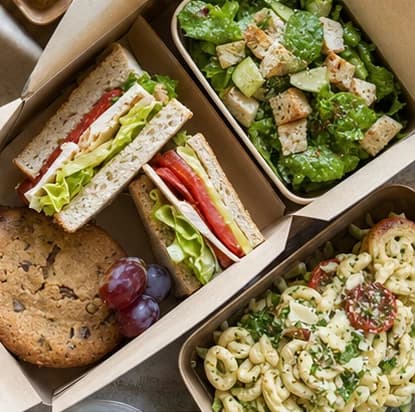
Use the meeting agenda as the deciding factor. If attendees will eat while slides are on screen, favor meals that stay contained and are easy to identify. Labelled office lunch boxes, wraps, bowls, and tidy platters can all work when the room, dietary labels, and pickup flow are confirmed. If the session includes a dedicated social lunch before or after the learning block, a shared spread may fit better.
| Format | Best fit | Main watchout |
|---|---|---|
| Labelled individual meals | Short sessions, fixed seats, named selections, and dietary-heavy groups | Needs accurate selections, labels, and sorting space |
| Lunch boxes or wraps | Presentation rooms where people need a complete, tidy meal | Confirm whether the box is a full lunch or only the main item |
| Compact platters | Small groups with a real break before the speaker starts | Needs serving utensils, table space, and dietary separation |
| Simple shared spread | Longer networking-style sessions | Can create queues and uneven portions if the room is tight |
Set delivery earlier than the learning start
For a lunch and learn, the important time is when people should be seated and ready, not when the driver reaches the building. Plan time for reception, elevators, room entry, item count, label checks, dietary separation, beverage setup, and removing empty boxes from the presentation area.
A practical brief names both a delivery window and a food-ready time. If the session starts at noon, the team may need food in the room earlier so attendees can collect meals, settle, and avoid interrupting the presenter. Toronto office buildings can add reception, elevator, loading, parking, or security steps, so the exact buffer should be confirmed for the real address.
- Session start time and desired seated-with-food time
- Accepted delivery window and building access details
- Primary receiver and backup receiver with phone access
- Room, floor, elevator, and setup surface
- Time needed to count meals and separate dietary labels
- Cleanup plan before the next meeting uses the room
Handle dietary meals before the room gets busy
Dietary planning should happen before the menu is approved, not while attendees are lining up. Collect countable requirements, ask provider-specific questions for the selected dishes, and decide whether labels use names, initials, categories, or another privacy-conscious system.
Do not promise that a dish is allergen-free, gluten-free, halal, vegan, or suitable for a specific attendee unless the selected provider confirms the current ingredients and handling limits for that exact meal. Keep protected meals separate during receiving so they are not taken accidentally by the general group.
- Collect dietary counts with the RSVP or registration form
- Send unresolved ingredient and cross-contact questions to the provider
- Confirm label wording before accepting the order
- Keep protected meals away from the general pickup area
- Assign one person to answer meal-location questions
- Document substitutions before delivery day
Use food to support attention, not to overload the room
A lunch-and-learn meal should be satisfying enough to replace lunch, but practical enough that attendees can focus. Heavy, messy, or hard-to-assemble meals may be right for another office event and wrong for a room where people are taking notes or following a presenter.
Useful starting points include wraps, sandwiches, bowls, bento-style meals, tidy Mediterranean or Middle Eastern plates, pizza with clear labels and sides, or other complete meals that can be served with minimal assembly. The goal is to compare boxed lunch catering, corporate lunch catering, office training catering, presenter-friendly meals, and labelled dietary meal handoff without turning the session into a generic menu tasting. The selected restaurant still needs to confirm current availability, portioning, ingredients, labels, and delivery timing.
| Setup | Food direction | Control to add |
|---|---|---|
| Boardroom presentation | Individual meals, tidy bowls, wraps, or lunch boxes | Pre-sort meals before attendees arrive |
| Training room with tables | Compact platters or labelled individual meals | Keep food away from laptops and materials |
| Breakout discussion | Meals people can pause and return to | Avoid sauces or assembly that slows the room |
| Recurring lunch-and-learn series | Rotating cuisines with the same intake process | Track attendance, leftovers, and popular formats |
Separate lunch and learn from all-day workshop catering
A lunch and learn usually has one main eating moment tied to a focused learning session. An all-day training or workshop may need arrival coffee, breakfast, morning refreshments, lunch, afternoon snacks, multiple rooms, facilitator meals, and a more detailed run-of-show.
If the event includes several food moments or room changes, use LunchLink's broader training-day and workshop catering guide. If the brief is one lunch connected to one talk, keep this page's simpler lunch-and-learn framework so the order stays focused.
- One lunch plus one talk: use a lunch-and-learn brief
- Breakfast, lunch, and breaks: use the training-day guide
- Several rooms or cohorts: send room-by-room counts
- Presenter is also the receiver: assign a backup contact
- Recurring sessions: reuse the intake form but refresh headcount every time
- Menu changes: reconfirm affected dietary and label details
Copy this lunch-and-learn catering brief
Use this copy-ready version when the date, room, and rough agenda are known. Replace the bracketed fields before sending it through the office lunch catering, Corporate Catering Toronto, or boxed lunches request path.
Lunch-and-learn catering brief template
Event: [lunch-and-learn topic], [date]
Agenda: food ready by [time], session starts at [time], session ends at [time]
Headcount: [confirmed onsite attendees], plus [presenters/facilitators/guests], possible additions by [deadline]
Location: [full Toronto/GTA address], [building/tower], [floor/room], [entrance/loading/security/elevator instructions]
Format preference: [labelled individual meals / lunch boxes / platters / simple shared spread / advice needed]
Dietary needs: [counts and labels required], [questions to verify with the selected provider]
Room setup: [pickup table, seating, presenter area, beverage station, waste location, cleanup owner]
Budget and billing: [food-only or all-in budget], [payment/invoice contact], [decision deadline]
Notes: [serviceware, beverages, sauces, leftovers, backup receiver, accessibility or room constraints]